🎨
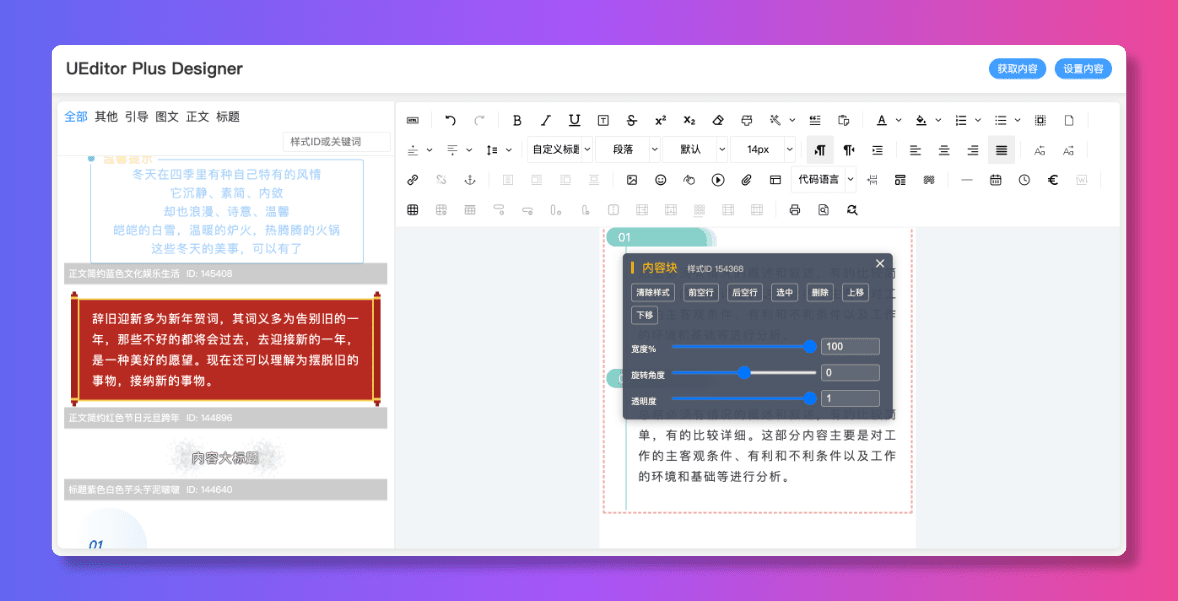
可视化设计
直观的可视化界面,拖拽式操作,所见即所得的内容编辑体验

<template>
  <UEditorPlusDesigner
    ref="designerRef"
    :config="editorConfig"
    @ready="handleReady"
    @change="handleChange"
  />
</template>

<script setup>
import { ref } from 'vue'
import { UEditorPlusDesigner } from 'ueditor-plus-designer'
import 'ueditor-plus-designer/style'

const designerRef = ref(null)

const editorConfig = {
  ueditorPath: '/ueditor-plus',
  ueditorConfig: {
    autoHeightEnabled: false
  }
}

const handleReady = () => {
  console.log('Editor is ready')
}

const handleChange = (content) => {
  console.log('Content changed')
}
</script>import React, { useRef } from 'react'
import { UEditorPlusDesigner } from 'ueditor-plus-designer/react'
import 'ueditor-plus-designer/style'
function App() {
const designerRef = useRef(null)
const config = {
ueditorPath: '/ueditor-plus',
ueditorConfig: {}
}
const handleReady = () => {
console.log('Designer ready')
}
return (
<UEditorPlusDesigner
ref={designerRef}
config={config}
onReady={handleReady}
/>
)
}<!DOCTYPE html>
<html>
<head>
<link rel="stylesheet" href="path/to/ueditor-plus-designer.standalone.css">
</head>
<body>
<div id="designer-container"></div>
<script src="path/to/ueditor-plus-designer.standalone.js"></script>
<script>
const designer = UEditorPlusDesigner.createDesigner({
ueditorPath: '/ueditor-plus',
ueditorConfig: {}
});
designer.on('ready', function() {
console.log('Designer ready');
});
designer.mount('#designer-container');
</script>
</body>
</html>无需复杂配置,几分钟内即可将可视化编辑器集成到您的项目中。提供合理的默认配置,同时保留完全的自定义能力。
支持自定义素材加载器,可以轻松对接现有的内容管理系统。提供完整的事件系统,满足各种业务场景需求。
基于成熟的 UEditor 编辑器构建,经过大量实际项目验证。完善的 TypeScript 支持,确保代码质量和可维护性。
采用 Vue 3 + TypeScript + Vite 构建,拥抱现代前端开发最佳实践。提供 React 适配方案,满足不同技术栈的需求。
UEditor Plus Designer 基于 Apache 2.0 协议开源。
使用说明:
如需商业授权,请访问 GitHub 仓库 联系我们。